


Start Designing for Free!
By Bliss & Bone
April 2026
A wedding guest list template gives you one spreadsheet where every guest, mailing address, RSVP status, and event assignment lives in one place. Instead of juggling separate lists for each event or copying addresses into a mail-merge document at the last minute, you have a single file that sorts, filters, and updates as your headcount evolves. Download our free wedding guest list template to get started. It opens in Google Sheets and exports directly to Excel if you prefer to work offline.
The template is built around a structure most couples need but rarely think to set up from the start: one row per person rather than one row per household, with a household grouping column that keeps families and couples connected across the whole planning process. The sections below walk through every column, explain the logic behind the structure, and answer the questions couples ask most once the list starts growing.
Downloading the wedding guest list template gives you 14 pre-built columns organized to carry you from first draft through thank-you notes. Here's what each one tracks and why it's there.
Household groups everyone who will receive one envelope under a shared number. Household 1 might be Mr. and Mrs. Smith — two rows, one number. Household 2 might be a solo guest and her unnamed plus-one. Because the template uses one row per person, the Household column is what keeps related guests connected. Sort alphabetically by last name to browse the list, then sort back by Household to see each family or couple grouped together again. That back-and-forth sort is how you quickly review who's assigned to which events, catch a guest you've listed twice under different names, or confirm that a family's headcount is correct before it goes to the caterer.
List marks whether each guest is on your A-list or B-list. Enter "A" for guests you're certain you want there and "B" for guests you'd love to include if space allows. Keeping this column next to Household means you can filter to each group in one click and manage your invitation waves without a separate document.
Envelope Name is the formal name that appears on the outside of a mailed invitation or as the display addressee on a digital one. It reads the way you'd actually address the piece: "Mr. & Mrs. John and Jane Smith" or "Miss Tabatha Norris & Guest." First and last name columns alone aren't enough — a couple with different surnames, a family with children, or a guest bringing an unnamed plus-one all need a version of their name that reflects who's included in the invitation and how formally you're addressing them. If you're sending online wedding invitations, the envelope name populates the display header your guest sees when the invitation arrives, so the care you put into this column shows up directly in how polished each invite looks on delivery.
First Name and Last Name live in separate columns for practical reasons. Mail-merge tools, address-printing services, and invitation platforms all require split fields. Keeping them combined in one column creates a formatting problem you'll spend hours fixing when you're ready to print or send.
Email is how you deliver digital invitations, share your wedding website, and follow up on RSVPs. Phone gives you a direct line for guests who haven't responded as your deadline approaches. Both fields become useful in the final weeks of planning when you're chasing down the last handful of pending responses.
Street Address, City, State, Zip, and Country appear as separate columns rather than one combined address field. Professional printing services and mail-merge tools require them split. Fixing a merged address field after 150 rows have been filled in is one of the most avoidable last-minute headaches in wedding planning.
Wedding and Rehearsal Dinner (the event columns) mark which events each person is invited to. One row, one person, one marker per event. When you add a welcome party, bridal brunch, or morning-after event, you add a column. This structure lets you filter to see only rehearsal dinner guests, pull an exact count for each venue's catering minimum, or instantly confirm whether a family friend was included in the ceremony.
Reading a column list is one thing; seeing a wedding guest list sample with real rows in it is another. Here's what the first three households look like once the template is filled in.
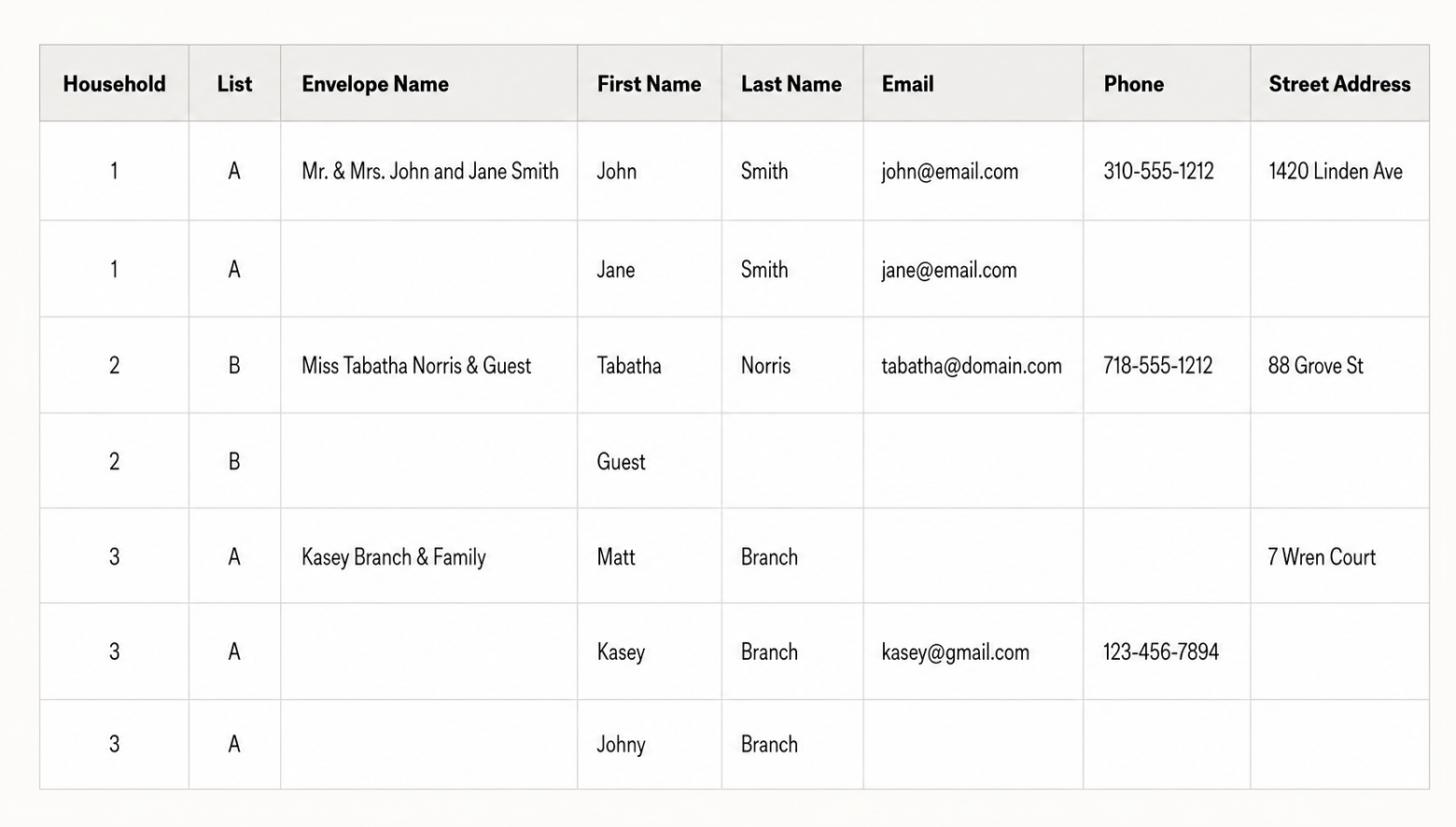
Three things to notice in this sample guest list. The Envelope Name is filled in only on the first row of each household, because one envelope goes to the household, not to each person in it. Household 2 shows an unnamed plus-one occupying a real row, so the headcount is already correct before the guest's name arrives. And Household 3 covers a family of three with a single envelope name — "Kasey Branch & Family" — while every individual still holds their own row for meal choice and RSVP tracking.
Contact fields stay deliberately incomplete in this example. You do not need every email and phone number to start; you need every person on a row. Fill the rest in as details come.
Most couples start with an instinct ("maybe 120 people?") and discover the actual list is longer before any cuts happen. A structured process keeps that first draft realistic.
Have both partners and both sets of parents write their lists independently without consulting each other first. When you merge them, you get an honest picture of where the headcount stands before anyone has lobbied for a specific cousin or a full table of work colleagues. The combined total is almost always larger than either partner expected.
From there, work with the numbers. The average wedding in 2024 had between 115 and 145 guests in attendance, according to The Knot's annual data, meaning the invite lists that produced those numbers started considerably larger. Wedding planners consistently estimate that 20 to 30 percent of invited guests will decline. If your venue holds 100 people and you want 80 in attendance, send invitations to approximately 100 to 110 people. Build that projection into your template from the start rather than discovering it after you've already sent every invitation.
Once the names are in, the work shifts from collecting to organizing. How you organize a wedding guest list determines whether you can answer a caterer's question in ten seconds or ten minutes.
Organize by household first, by list second, by event third. The Household column is your primary sort: it keeps every family and couple grouped under the envelope they'll actually receive. The List column (A or B) is your secondary filter, letting you isolate each invitation wave without opening a second file. The event columns are your third layer, so you can pull a rehearsal dinner count without touching the wedding count.
Everything else is a filter, not a new document. That is the whole discipline. The temptation once the list passes a hundred people is to spin off a separate spreadsheet for the rehearsal dinner, another for addresses, another for RSVPs, and every copy you make is a copy that goes out of date. One file, sorted and filtered different ways, stays accurate on its own.
A quick organizing pass to run monthly: sort by Household to check no family is split or duplicated, sort by Last Name to catch the same guest entered twice under different spellings, then filter by RSVP Status to see who still owes you an answer. Three sorts, five minutes, and the list is clean again.
An A-list is everyone you're certain you want at your wedding. A B-list is the group you'd genuinely love to include but are holding back due to venue capacity or budget. Most couples use some version of this system even without naming it formally.
The timing is what determines whether it works. Send A-list invitations first, with an RSVP deadline that gives you at least two to three weeks of buffer before you need to contact B-list guests. When declines come in, move B-list guests up and send their invitations. The gap between the two waves needs to be long enough that B-list guests receive their invitations before the A-list deadline becomes common knowledge. In the template, a "List" column with values like "A" or "B" handles this cleanly. Filter to each group separately to manage each wave without confusion.
A small guest list changes the math, not the method. Under about 50 guests, the 20 to 30 percent decline rate stops being reliable. With 40 invitations, a single family declining moves your headcount by more than 10 percent, so plan for a range rather than a number.
Small lists are also where the A-list and B-list system matters most, not least. A 200-person wedding absorbs a few surprises. A 40-person wedding does not, which makes a pre-built B-list of six to eight people the difference between a full table and a half-empty one.
The one structural change worth making: on a small guest list, add a Table or Seating column from day one. At 40 guests you'll be assigning seats early, and it's far easier to fill that column as you go than to reconstruct it in the final month.
Envelope name is the most underused column on most guest lists and one of the most practically useful. The etiquette rules are worth knowing before you fill in 150 rows.
For married couples sharing a last name, the traditional form is "Mr. & Mrs. [His First Name] [Last Name]." If you prefer both first names (increasingly common and completely correct), use "Mr. & Mrs. John and Jane Smith." For unmarried couples, list both names on one line: "Emma Davis and Carlos Vega." For a guest with an open plus-one whose name you don't yet have, use "[Guest Name] & Guest." For families where children are invited, include the children's names on an inner envelope and keep the outer addressed to the parents.
For digital invitations, these same rules apply. The envelope name becomes the display addressee on the invitation as it arrives in your guest's inbox or on screen. The more thoughtfully it's filled in, the more personal and intentional your digital invite feels, which matters more than most couples expect when guests are opening dozens of event invitations in the same month.
For the full breakdown of addressing rules, including how to handle hyphenated last names, military titles, and guests with a preferred name that differs from their legal name, see our guide on how to address a wedding invitation.
The cleanest method is to give each plus-one their own row under the same household number as the guest they're accompanying. If Tabatha Norris is bringing a guest whose name you don't yet know, Household 2 has two rows: one for Tabatha with her full contact information, and one for "Guest" with fields left blank until a name comes in.
Set a firm deadline in your RSVP process for plus-ones to provide their guest's name; three to four weeks before the wedding date is the standard window. Once you have the name, update the row. This approach keeps your headcount accurate from invitation through seating chart rather than requiring you to reconcile a separate informal list when names trickle in late.
Add RSVP columns for each event you're hosting. For the wedding itself, you need at minimum: RSVP Status (Yes / No / Pending), Meal Choice if you're offering options, and Dietary Restrictions. For a rehearsal dinner or other events, replicate the same columns for each.
Sort by RSVP Status periodically in the weeks before your deadline. Anyone showing "Pending" past your follow-up window gets a direct call or text. The Phone and Email columns are how you reach them without digging through a contact app. Wedding planners recommend giving guests four to five weeks to respond, with a deadline set at least two weeks before your caterer's final numbers are due.
Getting the timeline right matters more than most couples anticipate when they're first setting up their template. Our guide on wedding RSVP deadline explains how to set your deadline in relation to your caterer's cutoff, your invitation send date, and how to handle guests who miss it.
If children are invited, add a column for the number of children per household. Keep it separate from the main RSVP count so your caterer has an accurate split between adult and child meals. If you're doing a kids' table or a children's menu option, the count needs to be immediately filterable, not buried inside a Notes field.
Dietary restrictions belong in their own column for the same reason. When your catering team asks for a breakdown of vegetarian, vegan, gluten-free, and allergy-specific meals two weeks out, you want to filter a column and get an instant count. One merged "Notes" column requires re-reading every row at exactly the moment you have the least time.
Your guest list is one of the first things you build in the planning process, not one of the last. Headcount drives your venue search, catering budget, invitation quantity, and the timing for when you send save the dates online and formal invitations.
Most couples finalize their A-list within the first month or two of engagement, even when specific addresses and contact details take longer to collect. Starting your template early, even with incomplete rows, is always better than waiting for complete information. You can update fields as details come in. You cannot undo a venue deposit made without knowing how many people you were actually inviting.
For a complete breakdown of when each piece of stationery goes out, see our wedding invitation timeline.
Google Sheets works better for most couples because it allows real-time collaboration. You and your partner can update the same file simultaneously without version conflicts, and you can share view-only access with a planner or a parent without emailing a new copy every time something changes. It also works on any device without software installation.
Excel is a strong alternative if you're working offline or already live in Microsoft's ecosystem. The column structure and formulas in this template are compatible with both. Download our free wedding guest list template from Google Sheets, or export it directly to an Excel file from the File menu before saving it locally. The Excel format preserves every column, filter, and formula exactly as it appears in Sheets, so nothing needs rebuilding after the export.
At minimum: one row per guest (not per household), a Household grouping column, an Envelope Name column, separate First Name and Last Name fields, Email, Phone, and a full mailing address split into Street, City, State, Zip, and Country. Add event columns for every event you're hosting and RSVP status tracking for each. Meal choice, dietary restrictions, table number, and thank-you card sent are useful additions as you move closer to the wedding date.
Organize it in three layers inside a single file. Sort by Household so families and couples stay grouped under the envelope they'll receive, filter by the A/B List column to manage each invitation wave, and use the event columns to pull counts for the rehearsal dinner or welcome party without disturbing the wedding count. Avoid creating separate spreadsheets for separate purposes, because every copy you make is a copy that falls out of date. One organized file, sorted and filtered different ways, is what keeps your headcount accurate from first draft through final catering numbers.
Envelope name is the formal name that appears on the outside of a mailed invitation or as the display addressee on a digital one: the way you'd actually address the piece rather than just a first and last name. "Mr. & Mrs. John and Jane Smith" or "Miss Tabatha Norris & Guest" are envelope names. The column accounts for couples with different last names, guests with plus-ones, and families with children, ensuring each invitation is addressed correctly for both paper and digital sends.
Invite more people than your target attendance. Wedding planners consistently estimate that 20 to 30 percent of invited guests will decline. If you want 100 people in attendance, send invitations to approximately 120 to 130. Build a realistic projection into your template from the start. A "List" column with A and B designations lets you manage your A-list and backup list as separate waves without guessing.
A B-list is a secondary group of guests you invite to fill spots opened up by A-list declines. The A-list gets invitations first, with an RSVP deadline that leaves you enough time to contact B-list guests before your total count needs to be finalized. The key is timing the two waves far enough apart that B-list guests receive their invitations before the A-list deadline becomes common knowledge. Track both groups in your template with a "List" column so each wave can be filtered and managed separately.
One row per person. Household groupings are handled by the Household column, which assigns a shared number to everyone under the same envelope. One row per person keeps your headcount accurate, makes RSVP tracking clean, and lets you filter to any subset of your list without reformatting. One row per household obscures individual headcounts and creates problems the moment you need a per-person meal choice or dietary restriction.
Download our free wedding guest list template and start building your list in Google Sheets or Excel today.